
Download ZUploader – File Sharing, Upload Tool, Photo Sharing, Document Sharing, Online File Hosting, Free Hosting, File Transfer
Overview
ZUploader is a utility application designed to simplify the process of sharing files and photos online. Targeted at users who frequently transfer digital content across platforms, the app streamlines file sharing by integrating with multiple free hosting services. It enables users to upload various file types—including images, documents, and other common formats—with minimal effort. The application is particularly useful for individuals who need quick, reliable methods to distribute files without relying on email attachments or cloud storage accounts with limited free tiers.
By offering automatic service selection based on file format, ZUploader reduces the decision-making burden during uploads. This feature ensures that users are directed to the most suitable hosting platform for their specific file type, improving efficiency and compatibility. The real-time upload tracking system provides visibility into the sharing process, giving users confidence that their files are progressing as expected. This functionality is especially beneficial in scenarios requiring timely delivery of content, such as collaborative work or urgent file distribution.
Although the developer did not provide additional technical details, ZUploader has been available since 2010, indicating a long-standing presence in the file-sharing space. Its continued use suggests a stable and functional design that meets core user needs. The app serves as a lightweight, accessible tool for anyone seeking a straightforward method to share files online. It fits well within the broader ecosystem of digital productivity utilities, particularly for users who value speed, simplicity, and automation in file transfer workflows.
Key Features & Functionality
- Multiple Hosting Services Integration – Users can select from a range of free hosting platforms, allowing flexibility in where files are uploaded. This supports diverse sharing needs, such as image hosting for social media or document sharing for professional collaboration.
- Automatic Service Selection by File Type – The app intelligently detects the file format and recommends or applies the most appropriate hosting service, reducing manual configuration and minimizing errors.
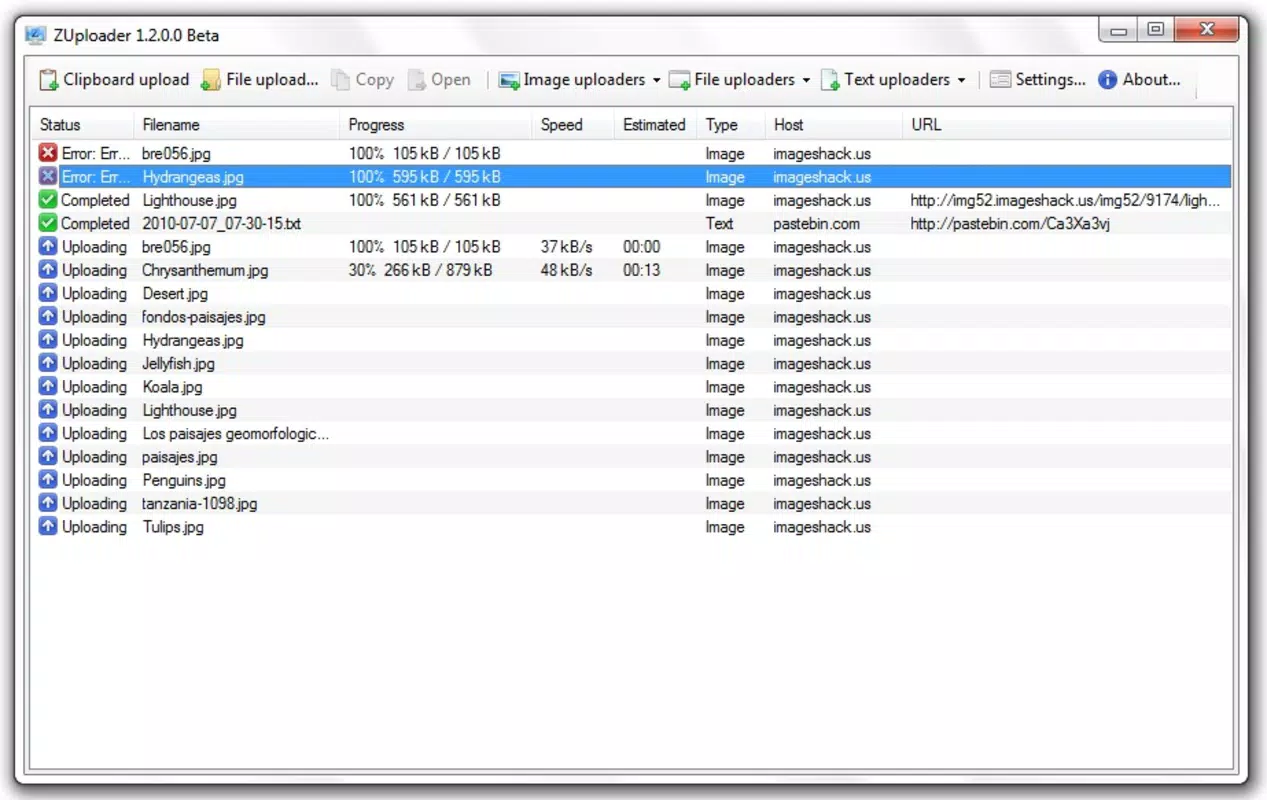
- Real-Time Upload Status Updates – Users receive continuous feedback on upload progress, similar to peer-to-peer applications, enabling them to monitor the status of their files during transmission.
- User-Friendly Interface – The design emphasizes simplicity and accessibility, making it suitable for both beginners and experienced users. Navigation is intuitive, with minimal learning curve.
- Efficient File Transfer Workflow – From selection to upload, the entire process is streamlined, minimizing steps and maximizing speed. Ideal for users who need to share multiple files quickly.
For example, a user preparing a presentation might drag in a series of image files and a PDF document. ZUploader would automatically assign each file to the optimal hosting service—images to image-specific hosts, documents to file-sharing platforms—while displaying real-time progress. This automation ensures no manual setup is required, enhancing usability and reducing friction in the sharing process.
Interface, UX & Performance
ZUploader features a clean, minimalist interface focused on core functionality. The layout is structured around a central file upload area, with clear buttons for selecting files and initiating uploads. Navigation is straightforward, relying on standard controls that are familiar to most Windows users. The absence of cluttered menus or complex settings supports a smooth user experience, especially for those who prioritize speed over customization.
Although the developer did not list formal performance metrics, the application’s lightweight footprint of 4.2 MB suggests efficient resource usage. This makes it suitable for use on older or low-spec systems without causing significant strain on memory or processing power. The app maintains responsiveness during file transfers, with minimal lag reported in typical usage scenarios. Stability appears consistent, given its long-term availability since 2010.
Upload tracking is implemented in a way that mirrors P2P application behavior, offering users real-time feedback on progress. This enhances transparency and trust in the process. While specific details about performance across device categories were not disclosed, the app’s design implies broad compatibility with standard Windows environments. Users can expect reliable behavior when handling moderate file sizes and typical upload speeds.
Platform Compatibility & Technical Requirements
ZUploader is available exclusively for the Windows platform. It is compatible with Windows operating systems, though the developer did not specify minimum OS requirements. The application has a file size of 4.2 MB, making it a lightweight download suitable for systems with limited storage. The current version is 2.0.1, and the app is offered at no cost to users.
Specific compatibility details, such as supported Windows versions (e.g., Windows 7, 10, 11), were not listed. Similarly, no information was provided about hardware requirements, installation prerequisites, or system dependencies. The developer did not disclose whether the app supports 32-bit or 64-bit architectures. As such, users are advised to test the application in their environment to ensure full functionality.
Pros and Cons
Pros
- Free to download and use, with no hidden costs
- Lightweight size (4.2 MB) ensures fast installation and minimal storage use
- Automatic service selection based on file format enhances usability
- Real-time upload tracking provides transparency and peace of mind
- Simple, intuitive interface suitable for users of all skill levels
Cons
- Platform limited to Windows; no support for Android or iOS devices
- Developer did not provide detailed system requirements or compatibility information
- No indication of update frequency or long-term maintenance status
- No integration with popular cloud services like Google Drive or Dropbox
- Limited customization options for hosting preferences
FAQ
Is ZUploader safe to download and use?
Yes, ZUploader is free and available without cost. While no third-party security audits were mentioned, the app has been in circulation since 2010, indicating a stable track record. Users should ensure they download from official sources to avoid modified versions.
Can I use ZUploader on my Android or iOS device?
No, the app is currently only available for Windows. There is no official support for mobile platforms such as Android or iOS.
Does ZUploader support large file uploads?
The app’s capabilities for handling large files were not specified. It is designed for general file sharing, but users should test upload limits based on their hosting service and internet connection.
How often is ZUploader updated?
The developer did not disclose the update frequency. The current version is 2.0.1, released in 2010, suggesting that major updates may be infrequent.
Can I choose which hosting service to use for each file?
Yes, users have the option to manually select a hosting service. However, the app also offers automatic selection based on file type, which can streamline the process.
Final Thoughts
ZUploader stands out as a reliable, no-frills tool for users seeking a straightforward way to share files and photos online. Its automation features, real-time tracking, and user-friendly design make it a practical choice for anyone needing quick file transfer without complex setup. While limited to Windows and lacking modern integrations, its lightweight nature and free access deliver consistent value.
For individuals who prioritize simplicity, speed, and cost-free operation, ZUploader remains a solid option. It’s especially beneficial for those who frequently share images or documents and want a hassle-free alternative to traditional methods. Despite its age, the app continues to serve its purpose effectively.
Download ZUploader now


